"Come back after one week" is one of the most common things a doctor says, and one of the least reliably followed. Patients feel better and forget, lose the prescription with the date on it, or simply do not know how to book. Patient follow-up management is the routine that turns the doctor's instruction into an actual return visit: recording the due date, seeing who is due or overdue, contacting them and booking them back in.
This guide explains why follow-ups slip, how to build a simple daily follow-up routine, what to say when you contact patients, how follow-ups connect to fees and records, and what software can and cannot do for you. It is written for doctors, clinic managers and front-desk teams.
Why patient follow-up management matters
For patients, a missed follow-up can mean an infection that was not checked, a dose that was never adjusted or a chronic condition drifting out of control. For the clinic, follow-ups are the backbone of continuity of care, and returning patients are the base of a stable practice.
Most clinics do not lose follow-ups because they do not care. They lose them because the information is in the wrong place: the date is written on the patient's prescription, not in a list the clinic can work from.
Where follow-ups usually fall through
- The follow-up date exists only on the paper prescription in the patient's bag.
- Nobody at the clinic has a list of who is due this week.
- Contacting patients depends on a staff member remembering to do it.
- Booking the return visit requires the patient to call during busy hours.
- When the patient does return, nobody marks the follow-up as done, so lists become unreliable.
If follow-ups are slipping at your clinic, schedule a 30-minute meeting and we will show you a follow-up list working from consultation to return visit.
The follow-up loop: five stages
Good patient follow-up management is a loop with five stages. If any stage is missing, follow-ups leak.
- Record: the doctor sets a follow-up date while completing the consultation, ideally with a short note ("review BP", "check wound").
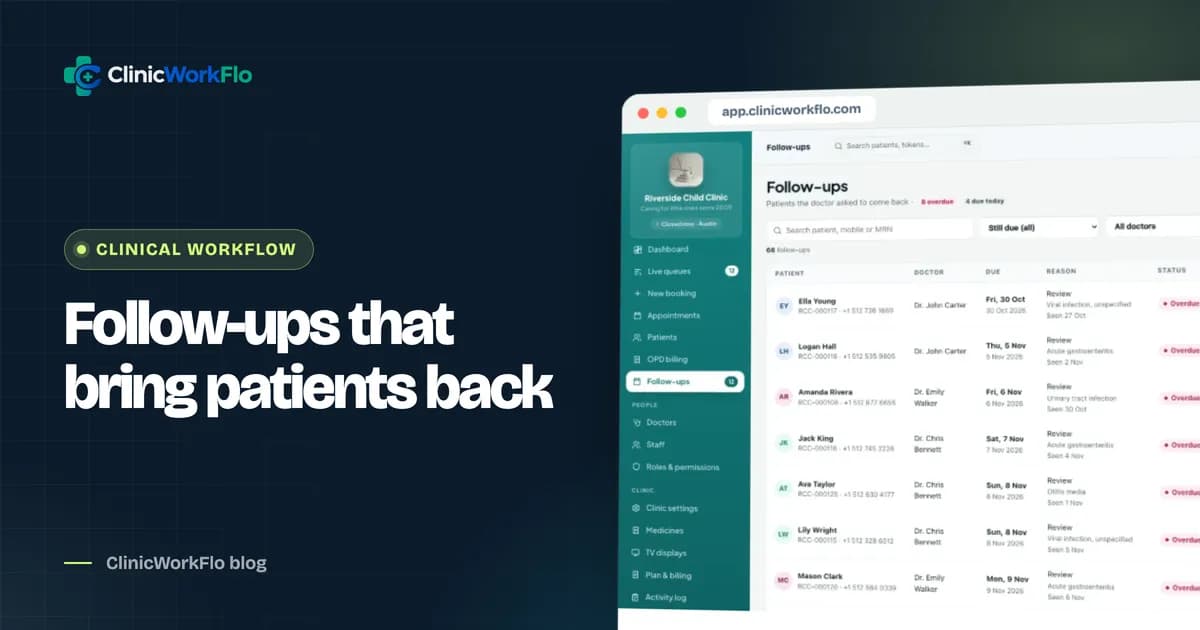
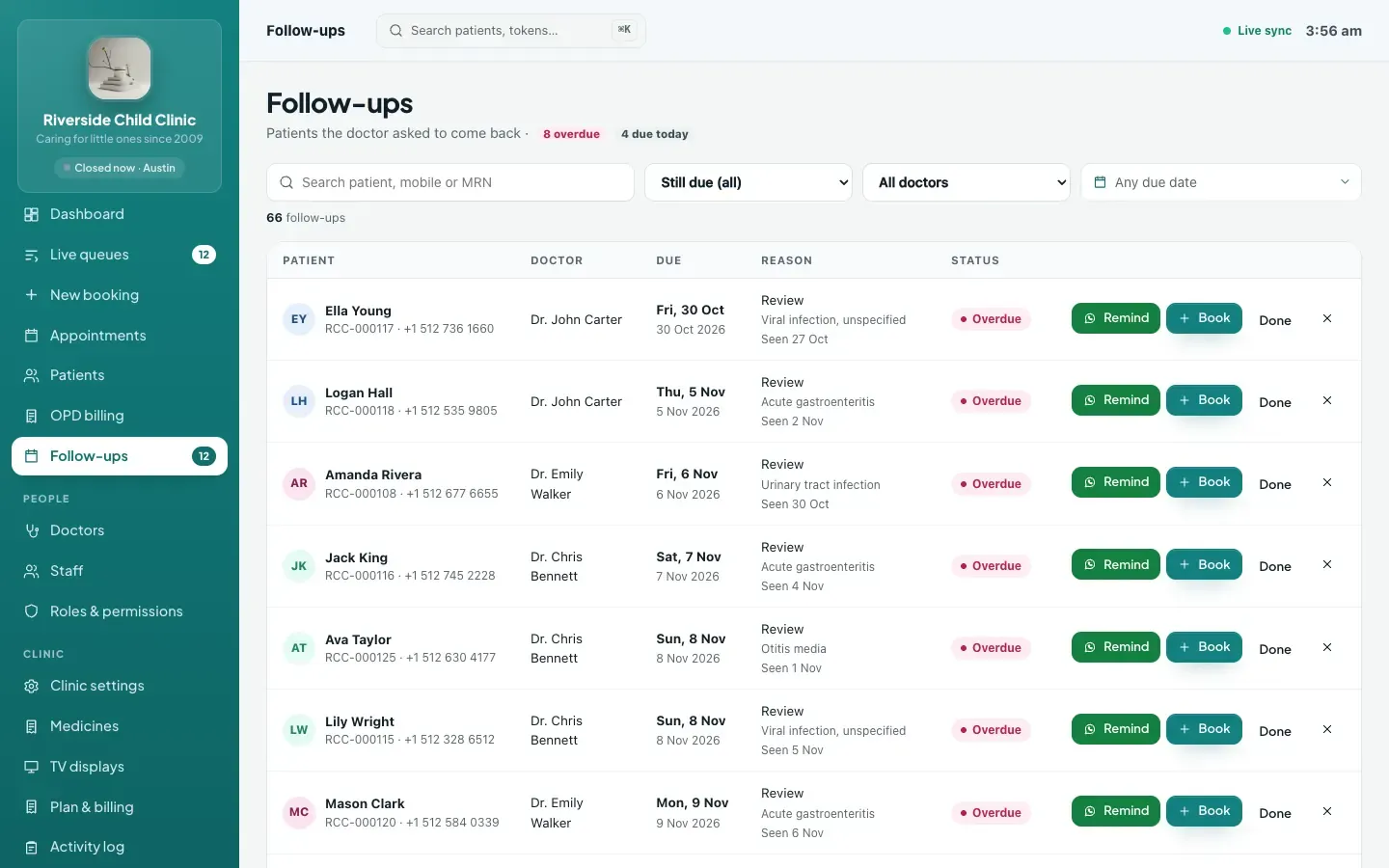
- List: the clinic has one list of follow-ups, grouped by due today, overdue and upcoming.
- Contact: a staff member reaches out to patients who are due, with a clear message and a booking link.
- Book: the return visit is booked with the same doctor, from the list itself.
- Close: when the patient is seen, the follow-up is marked done, so the list stays accurate.
Setting the follow-up at the right moment
The easiest moment to record a follow-up is when the doctor is already writing the prescription. If it is a separate step later, it will be skipped on busy days.
- Offer one-click choices: three days, one week, one month, or a specific date.
- Add a short note so whoever contacts the patient knows why.
- Print the follow-up date on the prescription, so the patient has it too.
- Make the follow-up date part of finishing the visit, not an afterthought.
In ClinicWorkFlo, the follow-up date is part of the consultation workspace. When the doctor completes the visit, the follow-up is created automatically and appears on the follow-ups list. You can read more about the consultation side in our guide to digital prescription software.
A daily follow-up routine for the front desk
Follow-up management works best as a short, fixed routine rather than an occasional clean-up. Fifteen minutes at a quiet time each day is usually enough.
- Open the follow-ups list and filter to "due today" and "overdue".
- Start with today's, then work through overdue patients, oldest first.
- Contact each patient using a clear, friendly message that includes the doctor's name, the due date and a booking link.
- Mark each one as reminded so a colleague does not contact the same person twice.
- Book directly when a patient replies or calls, with the same doctor, from the list.
- Close what no longer applies: cancel a follow-up the doctor says is no longer needed, or mark it done if the patient was seen elsewhere in the clinic.
- Look ahead at tomorrow's and this week's upcoming follow-ups if there is time.
Want help designing a routine for your team? Talk to our team and we will set up the follow-ups list with your doctors' habits in mind.
Contacting patients: what works
Choosing the channel
In India, WhatsApp is usually the most practical channel: patients read it, and messages can carry a link. A phone call works better for elderly patients or anything sensitive. Whatever you choose, keep a record that the patient was contacted.
Writing the message
Keep it short, personal and actionable:
- Use the patient's name and the clinic's name.
- Mention the doctor and the due date.
- Include a link they can tap to book a token.
- Avoid clinical details in the message; the patient's phone may be shared with family.
Hello Anita, this is a reminder from Riverside Child Clinic: your follow-up with Dr. Mehta is due on Monday, 16 November. Book your token here: [link]
Manual messages vs automated messaging
| Manual click-to-chat from a follow-up list | Fully automated messaging service | |
|---|---|---|
| Who sends | A staff member, from the clinic's WhatsApp | A system, from a business account |
| Set-up | None beyond the follow-up list | Business account, approved templates, messaging costs |
| Personal touch | High; staff can adjust each message | Standard template |
| Effort per patient | A few seconds per message | None once configured |
| Replies | Arrive in the clinic's normal WhatsApp | Depends on the service |
ClinicWorkFlo uses the manual click-to-chat approach today. It prepares the message and opens WhatsApp with the text filled in; your staff member presses send. It does not send automated reminders by SMS or WhatsApp, and we would rather say that plainly than let you assume otherwise.
Connecting follow-ups to booking, fees and records
Booking from the list
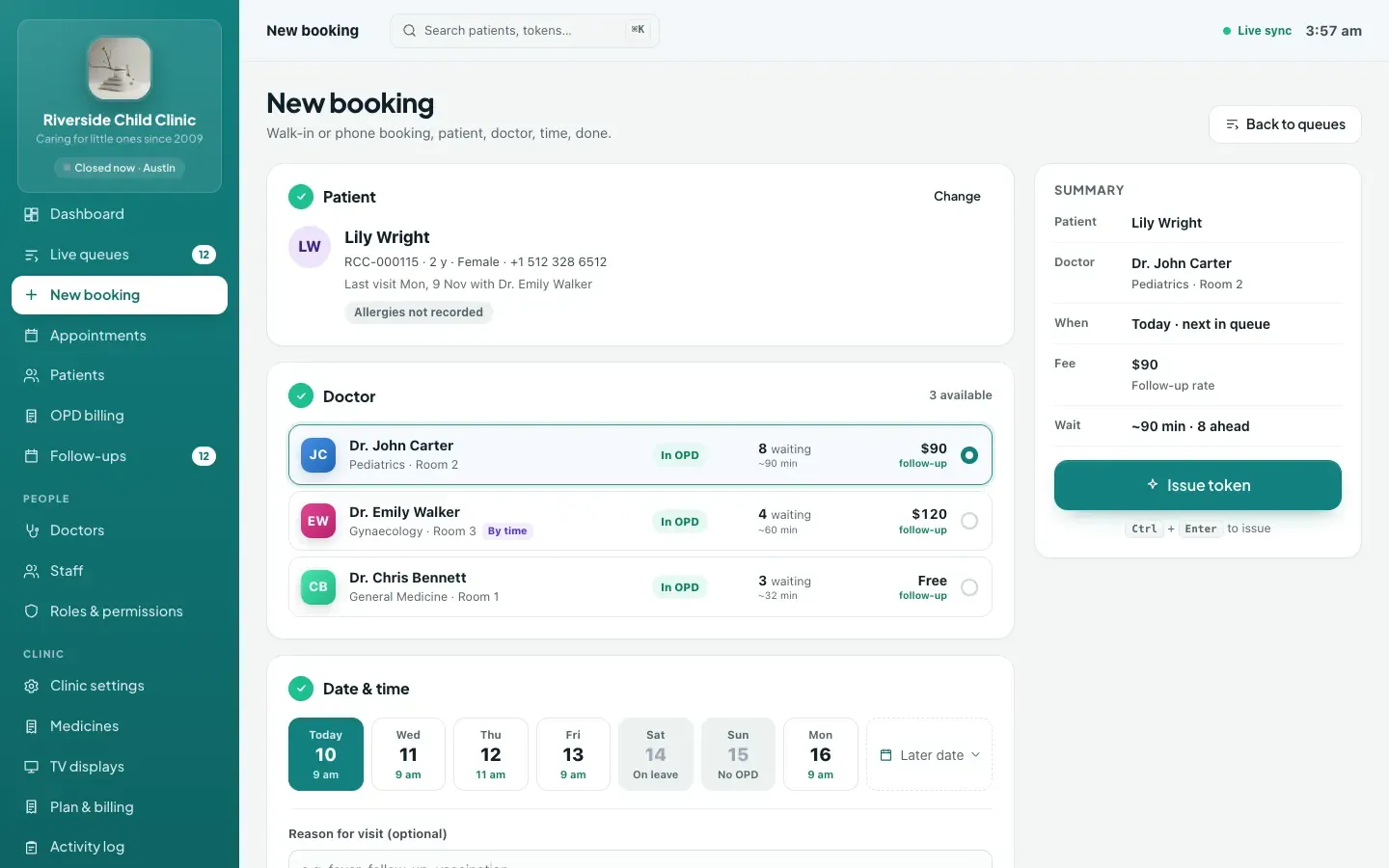
The fewer steps between "patient is due" and "patient is booked", the more follow-ups turn into visits. Booking straight from the follow-up row, with the doctor already chosen, removes most of the friction. The booked follow-up then shows as "booked" on the list, so staff know not to contact the patient again.
Follow-up fees
Many clinics charge a reduced fee for follow-ups within a set number of days. When the follow-up visit is billed, the system should apply the follow-up fee automatically if it falls within the doctor's window. See our OPD billing software guide for how that works.
Closing the loop automatically
When the patient is seen by the same doctor, the open follow-up should close by itself. In ClinicWorkFlo, completing a visit marks that doctor's earlier due follow-ups for the patient as done, so the list stays accurate without extra clicks.
The patient's history
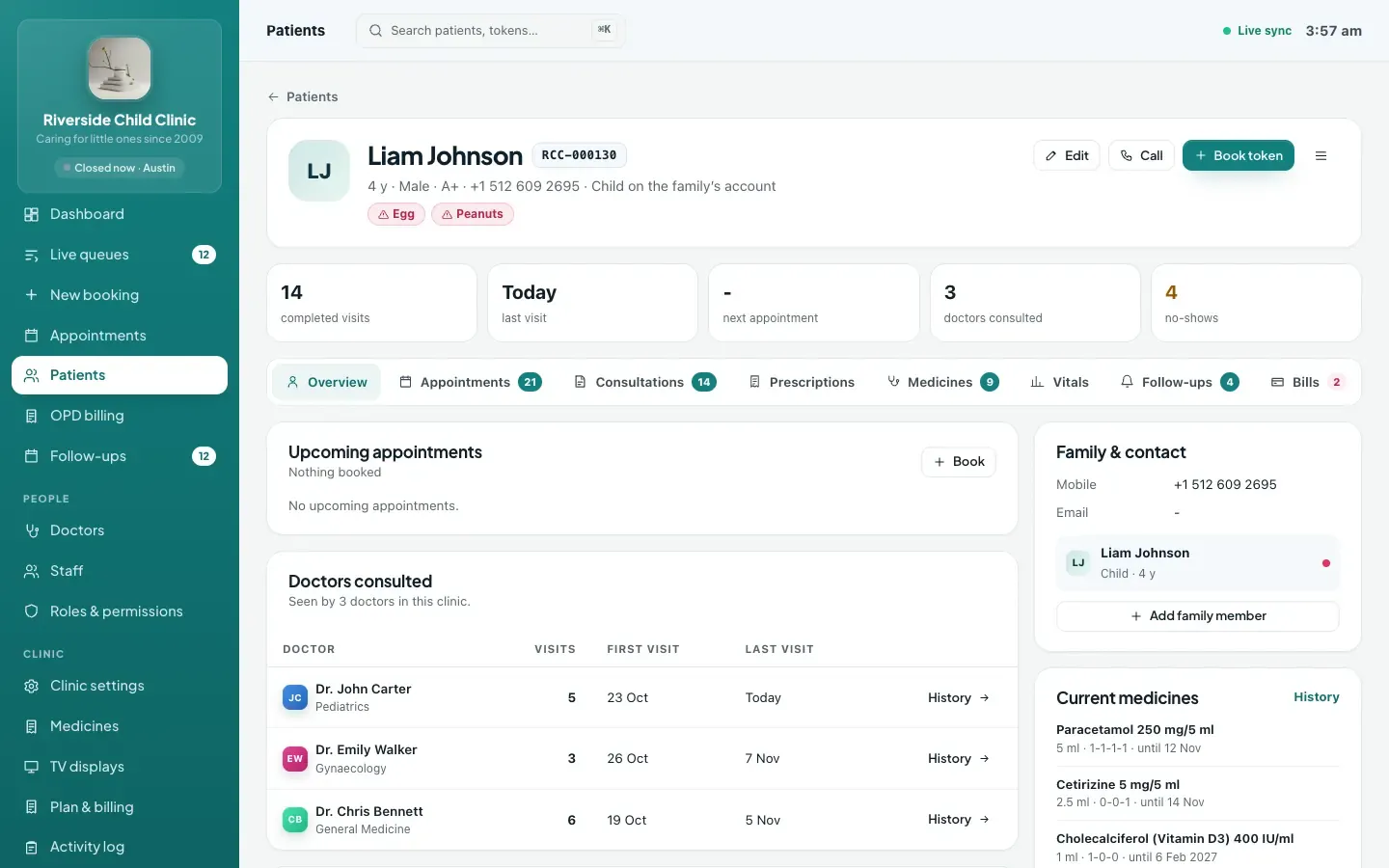
When the patient returns, the doctor should see the previous visit's notes, diagnosis and medicines immediately, along with why the follow-up was set.
Measuring your follow-up routine
You do not need complex reports. Each week, glance at:
- How many follow-ups are overdue, and whether that number is growing or shrinking.
- How many were booked from the list.
- Which doctors set the most follow-ups, and whether their patients come back.
If the overdue list keeps growing, the routine is not happening every day. That is a staffing or habit question, not a software one.
Prioritising who to contact first
On a busy day there may not be time to contact everyone on the list. A simple order of priority helps staff spend their time where it matters most:
- Clinically important follow-ups: the doctor's note says why, for example a wound check, a fever review in a child or a blood pressure review after a medicine change. Ask your doctors to write a short note whenever a follow-up really matters.
- Due today: patients who are expected now and may simply have forgotten.
- Recently overdue: a few days past the due date. These patients are often the easiest to bring back.
- Long overdue: weeks past the date. Contact them, but if there is no response after one message, cancel the follow-up or leave it for the doctor to decide rather than letting it clog the list.
- Upcoming: patients due later this week, if there is time left over.
Agree these priorities with your doctors once, write them down for the front desk, and revisit them after a month.
How ClinicWorkFlo helps
- Follow-up dates in the consultation: three days, one week, one month or a specific date, with an optional note, printed on the prescription.
- Automatic follow-up records created when the doctor completes the visit.
- One follow-ups list with overdue, due today, upcoming, booked, done and cancelled states, filterable by doctor.
- A ready WhatsApp message per patient with the doctor, due date and your booking link, opened in WhatsApp for staff to send, and marked as reminded.
- Book from the list with the same doctor, following your normal booking rules.
- Automatic closing when the patient is seen by that doctor.
- Follow-up fees applied in OPD billing within each doctor's follow-up window.
- Permissions: choose which roles can see the list and which can contact, close or cancel follow-ups.
Follow-ups are one part of a connected OPD. For the bigger picture, read our clinic queue management system guide, and for how patients book their return visit online, see online appointment booking for clinics.
To see the follow-up loop from consultation to return visit, book a 30-minute meeting with our team.
Frequently asked questions
What is patient follow-up management?
It is the process of recording when a patient should return, keeping a list of who is due or overdue, contacting them, booking the return visit and marking the follow-up as done once they are seen. Software makes each step faster and keeps the list accurate.
Does ClinicWorkFlo send automatic follow-up reminders?
No. ClinicWorkFlo prepares a WhatsApp message with the patient's due date and your booking link and opens it in WhatsApp, where a staff member sends it. Nothing is sent automatically by SMS or WhatsApp. The follow-up is then marked as reminded.
How are follow-ups created?
The doctor sets a follow-up date in the consultation, using a quick choice such as one week or a specific date. When the visit is completed, the follow-up is created and appears on the clinic's follow-ups list.
What happens when the patient comes back?
When the same doctor completes the patient's next visit, the earlier due follow-up is marked done automatically. If the follow-up was booked from the list, it shows as booked until then.
Can we charge a lower fee for follow-up visits?
Yes. Each doctor can have a separate follow-up fee and a follow-up window in days. OPD billing suggests the follow-up fee when the patient's last visit with that doctor is within the window.
Conclusion
Patient follow-up management is not about clever technology. It is about a clear loop: record the date during the consultation, keep one list, contact patients with a friendly message and a booking link, book them from the list and close the follow-up when they are seen. Make it a short daily routine, and returning patients stop depending on memory.
If you would like help setting this up, talk to our team or schedule a 30-minute meeting. You can also book a free demo to see follow-ups alongside the rest of ClinicWorkFlo.