Handwritten prescriptions have served doctors for generations, but they come with familiar problems: illegible lines, no copy for the clinic, no easy way to repeat last month's medicines, and no record to look back on when the patient returns. Digital prescription software solves these without slowing the doctor down, as long as it is built for the pace of a real OPD rather than a hospital ward.
This guide is for doctors and clinic owners considering a move from paper to digital prescriptions. You will learn what a good OPD consultation workspace includes, how to keep prescribing fast, which safety checks are worth having, how printing and sharing should work, and how to make the switch without disrupting your clinic.
What digital prescription software should do in an OPD
In an outpatient clinic, the doctor has a few minutes per patient. The software must fit inside that window. That means three things: it opens on the right patient automatically, it lets the doctor write quickly using what they already know, and it produces a clear prescription the patient can take away.
Behind that, it should quietly build the patient's record: complaints, findings, diagnoses, medicines and follow-up dates, so the next visit starts with context instead of a blank page. These are the basics of an electronic medical record for the OPD, without the weight of a full hospital system.
Handwritten vs digital prescription at a glance
| Handwritten | Digital prescription | |
|---|---|---|
| Legibility | Depends on handwriting | Always printed clearly |
| Clinic copy | Usually none, or a carbon | Saved with the visit automatically |
| Repeat medicines | Rewrite every line | Repeat the last prescription or use a template |
| Generic names | Often omitted | Printed alongside the brand when you choose |
| Allergy check | From memory | Warnings while prescribing |
| Patient copy | One sheet of paper, easily lost | Printout plus a private link on the phone |
| Corrections | Crossed out by hand | Amended with a reason, previous version kept |
If you are weighing up a move away from handwritten prescriptions, schedule a 30-minute meeting and we will show you a full consultation, from starting the token to the printed prescription.
The consultation workspace: what to look for
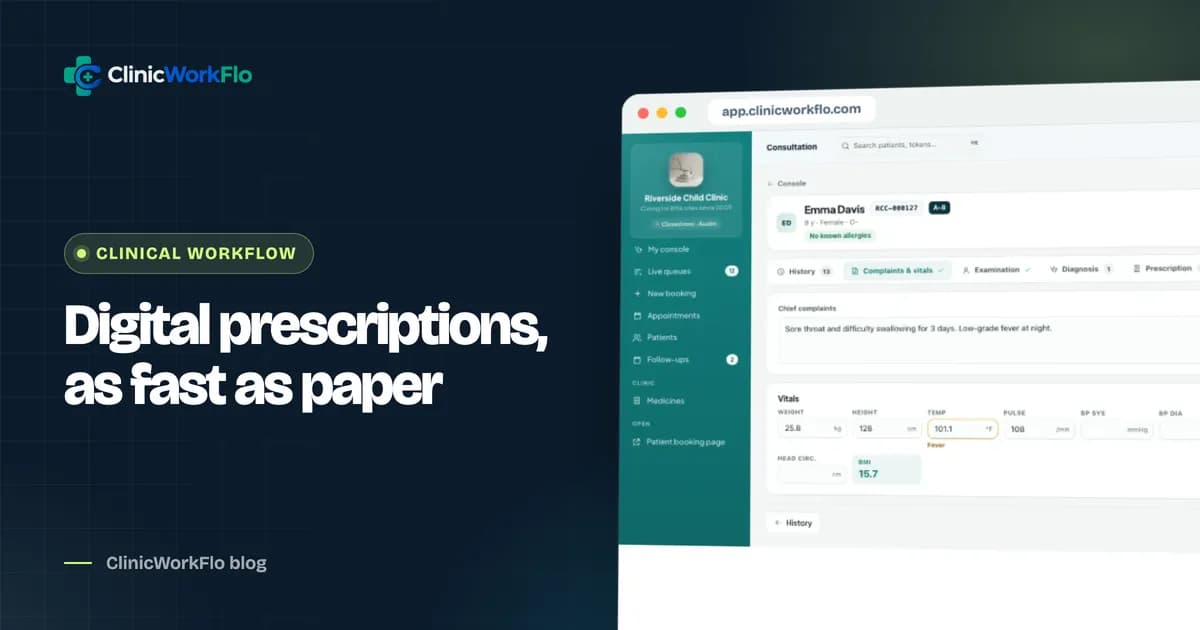
The consultation workspace is where the doctor spends most of the day. It should follow the natural order of a consultation.
1. Opens from the queue, on the patient's history
When the doctor starts a token, the visit should open automatically with the reason for visit already filled in as the complaint. Previous visits, current medicines, allergies and conditions should be visible without searching.
2. Vitals and examination
Weight, height, temperature, pulse, blood pressure, SpO2, respiratory rate and, for children, head circumference. Weight matters beyond the record: it drives safe dosing for children.
3. Diagnosis
A searchable diagnosis list such as ICD-10 keeps records consistent and searchable later, while still allowing free text where needed.
4. Medicines from a medicines master
Doctors should search by brand or generic name and pick from a clinic medicine list, with form and strength already filled in. Frequency should use the notation Indian doctors already write, such as 1-0-1 or SOS, with timing relative to food, duration and an automatic quantity for tablets.
5. Templates and repeat prescriptions
Most OPD prescriptions follow patterns: a viral fever template, a hypertension follow-up, a standard post-procedure course. Templates let the doctor add a full set of lines in one click and then adjust. Repeating the patient's last prescription is just as important for chronic conditions.
6. Investigations, advice and follow-up
Tests to be done, written advice (diet, rest, warning signs) and a follow-up date picked in one click: three days, one week, one month or a specific date.
7. Autosave and a clear finish
Everything should save as the doctor types, so a dropped connection or an accidental click loses nothing. Completing the visit should check what is filled, lock the record and create the follow-up.
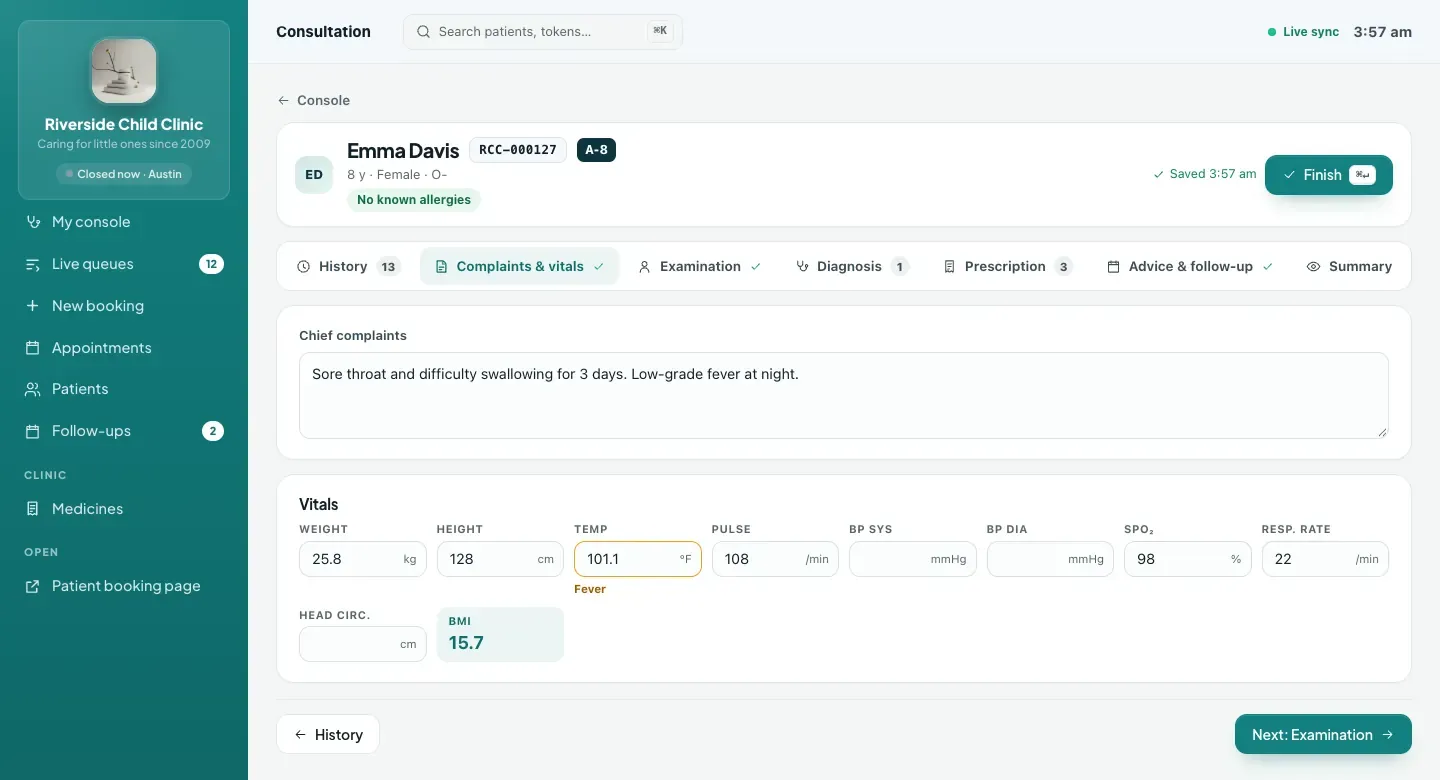
If you would like to see how fast a full prescription can be written, talk to our team and we will write a few with you using your own common medicines.
Safety checks that help without nagging
Good prescribing software warns at the right moments and stays quiet otherwise. Useful checks include:
- Allergy warnings, including drug groups, so a penicillin allergy flags amoxicillin.
- Duplicate medicine warnings when the same medicine is added twice.
- Weight-based dose suggestions for children, calculated from the weight entered at the visit and the medicine's dose per kilogram.
- Maximum-dose warnings when a dose goes above the per-kilogram maximum set in the medicines master.
- Medication history showing which courses are active, completed or taken only when needed.
These checks support clinical judgement; they do not replace it. The doctor always decides.
The medicines master and templates
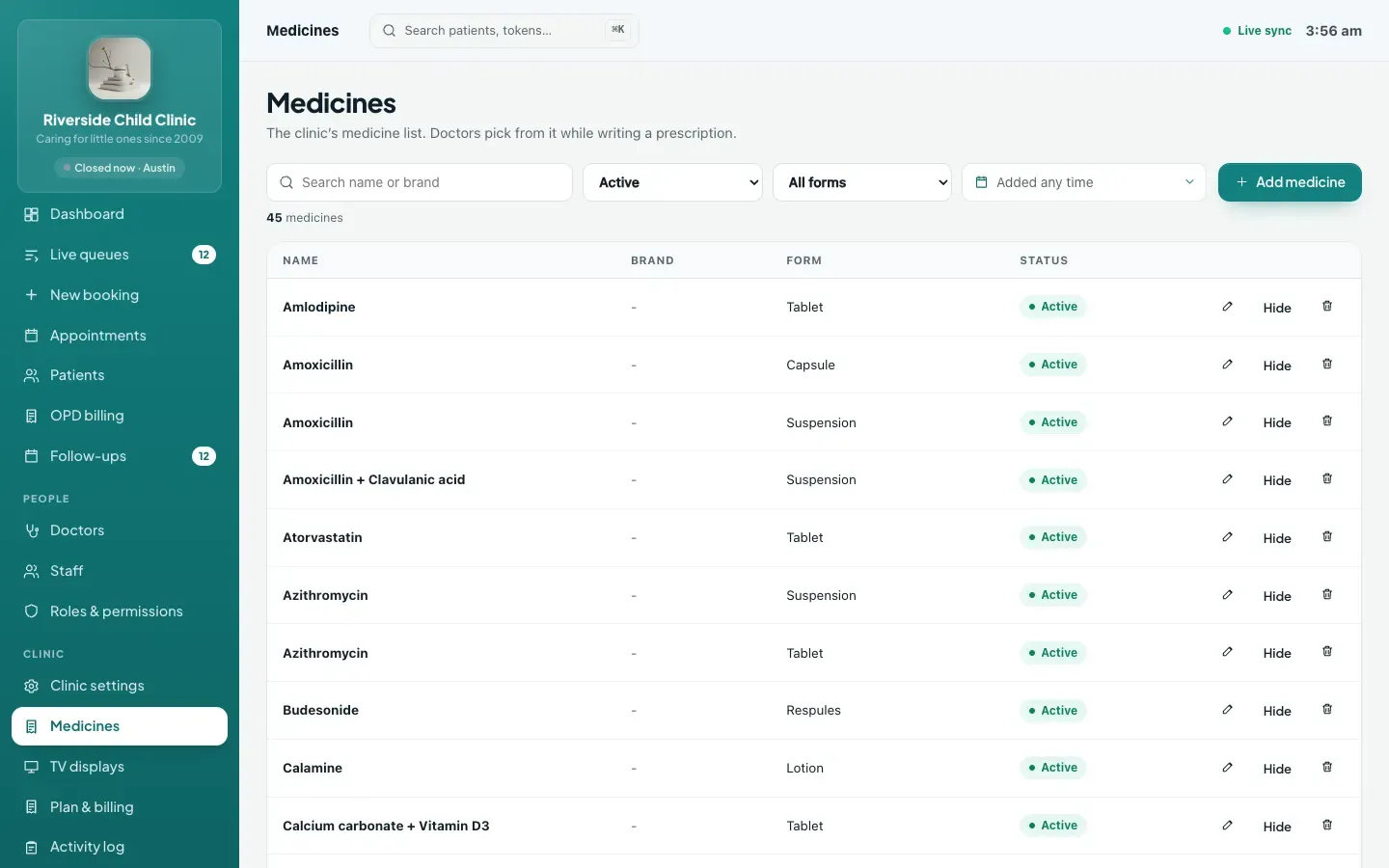
A medicines master is the clinic's own list of medicines, with generic name, brand, form, strength and default dosing. It is worth investing an hour in it at the start, because it makes every later prescription faster and more consistent.
- Start from a starter list and add the brands your doctors actually prescribe.
- Import a list in bulk from a CSV file if you already have one.
- Hide medicines you no longer use rather than deleting them, so old prescriptions stay intact.
- Let each doctor keep personal templates, and share common ones across the clinic.
- Review usage counts occasionally to see which medicines are prescribed most.
Printing and sharing the prescription
Printing
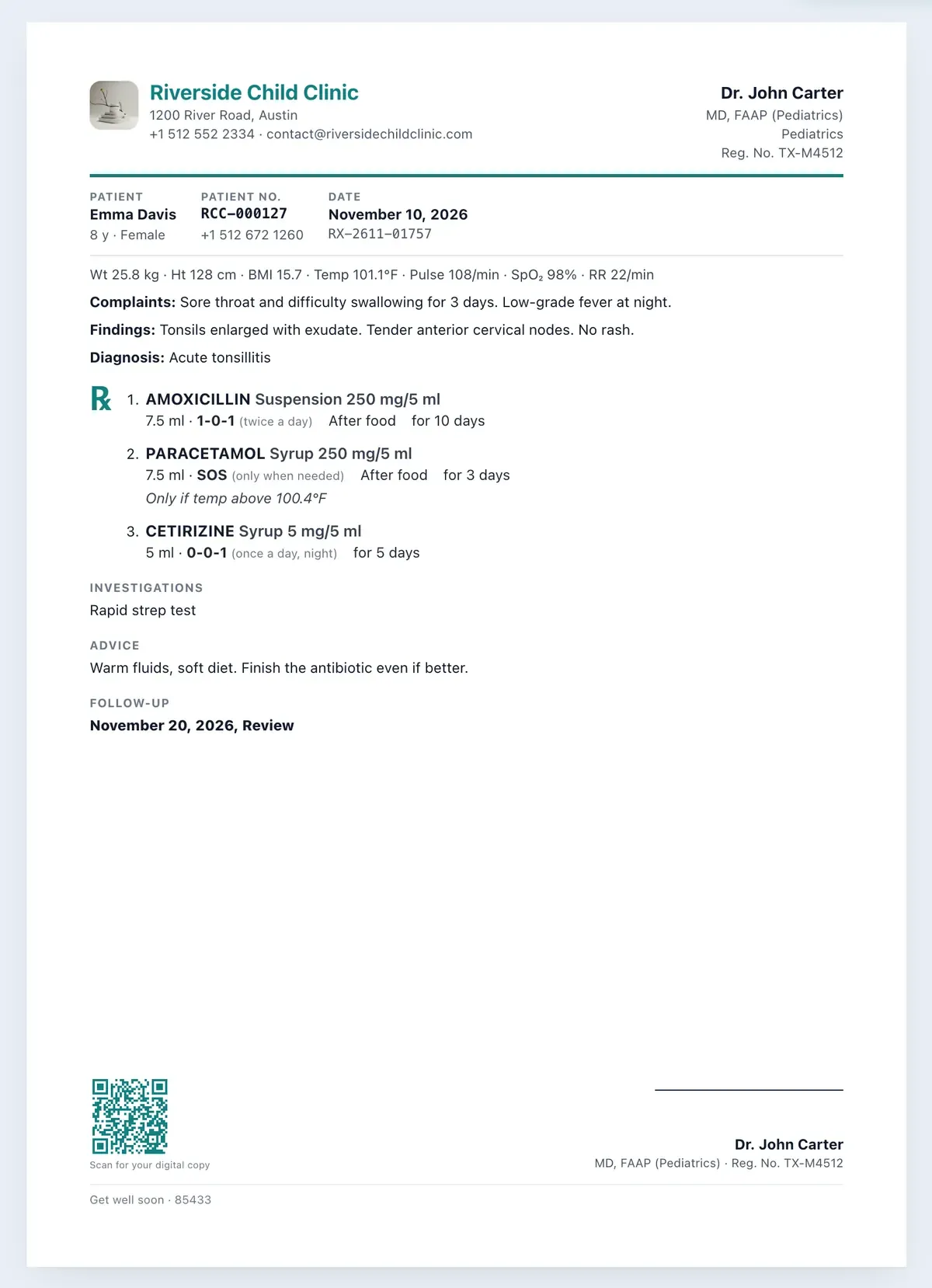
Clinics print on different paper. The software should support A4, A5 and Letter, either with a printed clinic header or leaving space at the top for pre-printed letterhead. The prescription should show the doctor's name, qualification and registration number, the patient's details, diagnoses, medicines (with the generic name if you choose), investigations, advice and follow-up date, and a footer line of your choice.
A private link for the patient
Paper gets lost. A private link lets the patient open their prescription on their phone at any time. In ClinicWorkFlo, reception or the doctor can share it by WhatsApp click-to-chat, and the patient's tracking page also shows the link once the visit is finalised. The link shows the prescription only, never the doctor's private notes, vitals or history, and the clinic can replace it if it was sent to the wrong number.
Privacy: who can see clinical notes
In a clinic with several doctors and front-desk staff, not everyone should read every note. A sensible model is:
- The treating doctor writes and reads their consultations.
- Reception can print and share prescriptions without seeing complaints, findings, vitals or history.
- A doctor opening a record of a patient they have not treated must give a written reason, which is logged.
- A completed prescription is never edited silently. Changes are amendments with a reason, and the previous version is kept.
Switching from paper: a practical plan
- Set up the medicines master with your most-used medicines and dosing defaults.
- Create five to ten templates for the conditions you see daily.
- Set the print layout for your paper size and letterhead.
- Start with one doctor for a week, ideally the most enthusiastic one.
- Use repeat prescriptions for returning chronic patients from the first day; it is where time is saved fastest.
- Expand to all doctors once templates and the medicines list feel complete.
Common mistakes when moving to digital prescriptions
- Skipping the medicines master. If doctors have to type every medicine from scratch, they will give up within a week. Spend the first hour adding the fifty medicines you prescribe most.
- Too many templates. A handful of well-named templates is more useful than fifty slightly different ones nobody can find. Review them once a month and delete duplicates.
- Not recording weight for children. Weight-based dose suggestions only work if the weight is entered at the visit. Make it part of the routine before the child goes in.
- Ignoring allergies at registration. Allergy warnings depend on allergies being recorded. Ask about them the first time a patient is seen, and update them during consultations.
- Printing before checking the layout. Print a test prescription on your actual paper before the first clinic day, especially if you use pre-printed letterhead, and adjust the top margin until it lines up.
- Treating the private link as optional. Patients lose paper. Sharing the link takes a few seconds and saves repeated "can you send my prescription again?" calls later.
How ClinicWorkFlo helps
ClinicWorkFlo's consultation workspace is part of the same system as the queue, so the visit opens when the doctor starts a token and closes when they complete it. It includes:
- A consultation workspace with complaints, history, examination, vitals, ICD-10 diagnosis search, prescription, investigations, advice and follow-up, saved as you type.
- A medicines master with generic and brand names, forms, strengths, CSV import and usage counts.
- Templates (personal and shared) and repeat the last prescription.
- Indian frequency notation (1-0-1, SOS and so on), food timing, duration and automatic tablet quantities.
- Weight-based dose suggestions for children, plus allergy, duplicate and maximum-dose warnings.
- Printable prescriptions on A4, A5 or Letter, with your header or pre-printed letterhead, generic names and a custom footer.
- A private prescription link for the patient, shared by WhatsApp click-to-chat and shown on their tracking page.
- Numbered prescriptions, locked records and amendments with reasons, plus role-based access to clinical notes.
See how consultations connect to the queue in our clinic queue management system guide, how follow-up dates turn into return visits in patient follow-up management, and how the visit becomes a bill in OPD billing software. The full module list is on our features page.
Curious how it would feel in your consulting room? Book a 30-minute meeting and bring your five most common prescriptions; we will build them as templates during the call.
Frequently asked questions
What is digital prescription software?
It is software that lets doctors write prescriptions on a computer or tablet instead of by hand. It saves each prescription with the patient's visit, prints a clear copy, and can give the patient a digital version, while building a consultation record for future visits.
Will writing prescriptions digitally slow the doctor down?
Usually only for the first few days. Templates, repeating the last prescription and a medicines list with default doses make most prescriptions quicker than writing them by hand, especially for returning patients with chronic conditions.
Can we print on our existing pre-printed letterhead?
Yes. ClinicWorkFlo lets you turn off the printed header and leave blank space at the top, so the prescription lines up with your pre-printed paper. A4, A5 and Letter sizes are supported.
Does the software check for drug allergies and child doses?
ClinicWorkFlo warns about recorded allergies, including drug groups, about duplicate medicines and about doses above the per-kilogram maximum. For children it can suggest a dose from the weight entered at the visit. The doctor always makes the final decision.
Can a prescription be changed after the visit is completed?
Completed visits are locked. If a correction is needed, the doctor creates an amendment with a written reason. The previous lines and the reason are kept, and the prescription's version number increases.
How does the patient get a digital copy?
Each completed prescription has a private link. Staff can share it with the patient via WhatsApp click-to-chat, and it also appears on the patient's tracking page once the visit is finalised. The link shows only the prescription, not the doctor's notes.
Conclusion
Digital prescription software earns its place when it is faster than paper, safer than memory and clearer for the patient. Look for a workspace that opens from the queue, a medicines master and templates that match how your doctors prescribe, sensible safety checks, flexible printing and a private link for the patient. Set up the medicines list and templates first, start with one doctor, and expand once it feels natural.
To talk through your consulting-room workflow, contact us or schedule a 30-minute meeting.